

Most developers treat AI output templates as a formatting convenience. They are not. The role of output templates in AI is closer to a contract than a suggestion. Raw LLM output is inconsistent by nature. It hallucinates field names, wraps JSON in markdown fences, truncates at token limits, and drifts between runs. Templates are the mechanism that turns probabilistic text generation into something a production system can actually consume. Get this wrong, and you are debugging silent failures at 2am instead of shipping.
Table of Contents
- Key Takeaways
- The role of output templates in AI explained
- Technical methods for implementing reliable templates
- Reducing errors with built-in quality gates
- Output template best practices for developers
- My take: templates changed how I think about AI reliability
- Fix broken AI output with Datatool
- FAQ
Key Takeaways
| Point | Details |
|---|---|
| Templates are contracts, not hints | Treating output templates as strict schema contracts yields near 100% reliability versus loose prompt instructions. |
| Schema validation stops silent drift | Hard constraints and validation hooks catch outputs that look correct but break downstream systems. |
| Quality gates cut editing by 40% | Embedding a self-review step inside templates reduces human editing by roughly 40%. |
| Briefing beats model upgrades | Under-specified assignments cause mediocre output far more often than model limitations. |
| Separate structure from content | Splitting framework generation from content filling reduces token waste and improves output correctness. |
The role of output templates in AI explained
An output template tells the model exactly what to produce: the shape, the fields, the types, and the constraints. It is not a polite request. There are three common forms in production use today.
- Prompt-based instructions: Natural language rules embedded in the system prompt. Flexible but unreliable. The model can ignore them under pressure.
- JSON schema contracts: A structured schema passed alongside the prompt. The model's output is validated against it at runtime. Failures trigger a retry or a repair step.
- Constrained decoding templates: Schema enforced at the token generation level using a finite state machine. The model physically cannot produce output that violates the schema.
Each form serves a different use case. A marketing automation pipeline generating ad copy at scale can work with prompt-based templates if a validation layer catches failures. A financial API returning transaction records cannot. It needs constrained decoding or strict schema validation.
AI output template functions cover three main jobs: guiding format, enforcing quality, and enabling downstream automation. Without a template, every consumer of the AI output needs its own parsing logic. With one, your parser is written once and tested once.
Pro Tip: Encode two or three concrete examples of correct output directly inside your template. This is sometimes called "samples of success." Models follow examples more reliably than they follow abstract instructions, and encoding these samples locks in brand voice and structural consistency at scale.
Technical methods for implementing reliable templates
Four implementation approaches exist, and they are not interchangeable. Choosing the wrong one for your context is a common source of production failures.
- Plain prompt instructions: Tell the model to return JSON. Works for simple cases. Breaks under ambiguity, long outputs, and temperature above zero.
- JSON mode: Forces the model to return valid JSON syntax. Does not enforce field names, types, or required properties. A common false sense of security.
- Schema-constrained generation: Pass a JSON Schema or Zod schema to the model API. OpenAI's structured outputs and Anthropic's tool use both implement this. Near 100% schema adherence in production, with a latency tradeoff of 50 to 200ms for deep recursive schemas.
- Constrained decoding: Token-level enforcement via FSM compilation. Highest reliability. Highest setup cost. Used in latency-sensitive or compliance-critical systems.
Here is what a common schema failure looks like, and how a validation and retry loop fixes it:
"``python import json import jsonschema
SCHEMA = { "type": "object", "required": ["product_id", "price", "in_stock"], "properties": { "product_id": {"type": "string"}, "price": {"type": "number"}, "in_stock": {"type": "boolean"} }, "additionalProperties": False }
def call_llm(prompt: str) -> str: # Simulated LLM response with a broken field name return '{"productId": "abc123", "price": 9.99, "in_stock": true}'
def get_validated_output(prompt: str, retries: int = 2) -> dict: for attempt in range(retries): raw = call_llm(prompt) try: data = json.loads(raw) jsonschema.validate(instance=data, schema=SCHEMA) return data except (json.JSONDecodeError, jsonschema.ValidationError) as e: print(f"Attempt {attempt + 1} failed: {e}") raise RuntimeError("LLM failed to return valid output after retries")
The failure here is a renamed field. `productId` instead of `product_id`. JSON mode would pass this silently. Schema validation catches it and triggers a retry. [Using JSON Schema](https://www.augmentcode.com/guides/ai-spec-template) or Zod for runtime validation is what separates a demo from a production system.
| Method | Schema adherence | Latency impact | Setup complexity |
| --- | --- | --- | --- |
| Prompt instructions | Low | None | Low |
| JSON mode | Partial | Minimal | Low |
| Schema-constrained | High | Moderate | Medium |
| Constrained decoding | Near 100% | Significant | High |
**Pro Tip:** *Start with schema-constrained generation via your model provider's native API. Add constrained decoding only when latency is non-negotiable or compliance requires it.*
## Reducing errors with built-in quality gates
Silent drift is the failure mode that gets teams in trouble. The model returns output that parses without error but violates a business rule. A required field is an empty string. A date is formatted differently from what your downstream system expects. A numeric value is returned as a string. None of these throw an exception. All of them cause problems later.
[Silent drift causes](https://dev.to/michael_xero_ai/how-to-write-an-ai-agent-prompt-that-actually-works-not-just-once-iaf) AI to produce outputs that look correct but fail technical requirements. The fix is not hoping the model improves. The fix is defining terminal states with hard constraints in the template.
> A quality gate is not a nice-to-have feature in a production AI pipeline. It is the difference between a system that degrades silently and one that fails loudly and recovers.
Best practices for building quality gates into templates:
- Define every required field explicitly. No optional fields unless your downstream code handles null cleanly.
- Add `additionalProperties: false` to JSON schemas. This forces the model to stay inside the contract, not invent new fields.
- Include a self-review instruction at the end of the template prompt. Ask the model to check its own output against the specified criteria before finalizing. This alone reduces human editing by roughly 40%.
- Use [external validation hooks](https://dev.to/aws/prompt-ai-coding-assistants-to-build-production-ready-agents-8-essential-patterns-fm5) to apply business logic checks after generation. These neurosymbolic guardrails catch failures that schema validation cannot, such as a price of negative zero or a date set 50 years in the future.
Pair this with AI output observability so you can see drift patterns across runs before they become production incidents.
## Output template best practices for developers
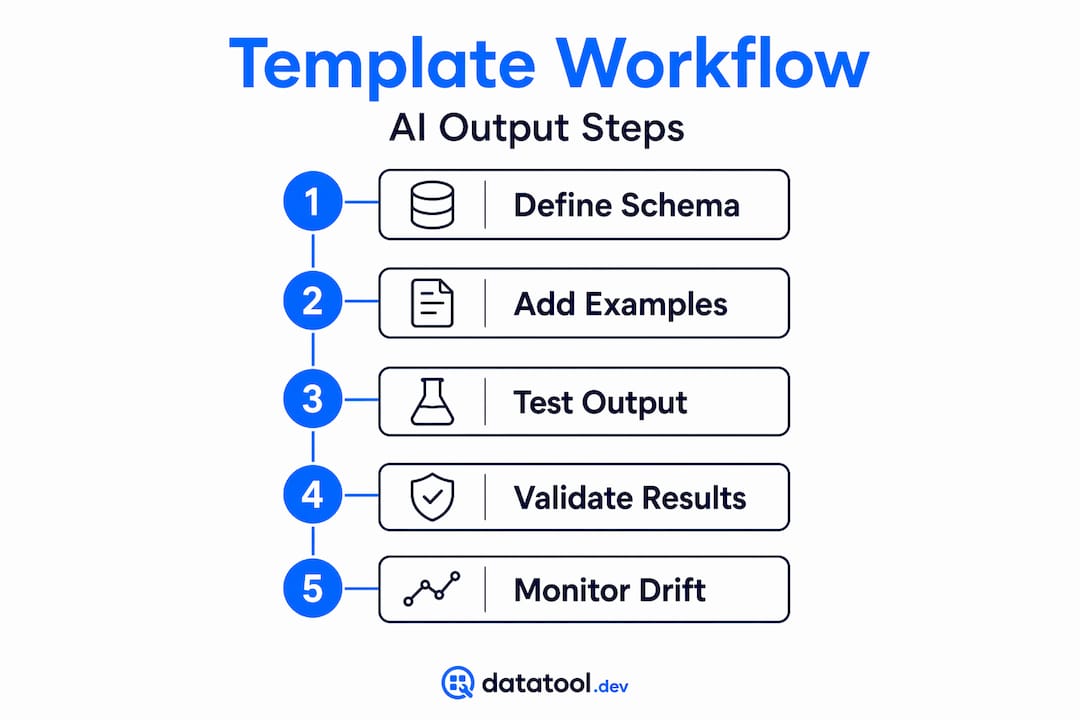
The biggest mistake developers make is treating a template like a single prompt they write once and forget. Templates need the same lifecycle as code: write, test, measure, refine.
1. **Write a comprehensive brief, not a simple prompt.** Mediocre output comes from under-specified assignments, not weak models. Include goals, constraints, output format, and at least one example of acceptable output.
2. **Add few-shot examples inside the template.** Not descriptions of what good output looks like. Actual examples. The model will follow structure it can see far more consistently than structure it is told to imagine.
3. **Separate structure generation from content filling.** Asking the model to generate a template framework and fill it in one pass wastes tokens and reduces control. [Splitting these stages](https://www.howtothink.ai/learn/output-templates-reduce-startup-fiction) improves correctness and gives you a checkpoint between them.
4. **Test templates with a fixed test set.** Run the same inputs through a revised template and compare outputs. If you cannot measure improvement, you cannot trust that your changes worked.
5. **Integrate unit testing for AI outputs into your CI pipeline.** A template that passes on Tuesday can drift by Friday when a model is updated. Automated tests catch that before it reaches production.
Prompt quality determines output quality far more than model choice. A well-structured template with a mid-tier model will consistently outperform a vague prompt with the best model available.
**Pro Tip:** *Version your templates alongside your code. A template is a dependency. Treat it like one. Tag releases, write changelogs, and roll back when output quality drops.*

## My take: templates changed how I think about AI reliability
I have spent enough time debugging broken AI pipelines to have a clear opinion on this. When a project goes sideways with AI, the first thing I look at is not the model. It is the template.
Vague prompts produce vague outputs. Every time. I have seen teams spend weeks upgrading to newer models when the real problem was a template that gave the model no structure to follow. Swapping to a better model with the same bad template just gets you bad output faster.
What actually changed my results was treating templates as executable contracts. Not guidelines. Not suggestions. Contracts. Once I started writing templates with explicit terminal states, hard field constraints, and a self-review step, the number of silent failures in production dropped significantly. The model did not get smarter. The instructions got tighter.
The contrarian point worth making: most teams obsess over model selection and almost nobody obsesses over template quality. That is backwards. Your AI output determinism comes from your template, not from the model's architecture. Fix the template first. Then upgrade the model if you still need to.
> *— Gregory*
## Fix broken AI output with Datatool
When output templates fail in production, the result is usually malformed JSON. Truncated objects, invalid escaping, schema drift, wrapped responses. These break parsers silently or loudly, and either way they cost time.
[](https://datatool.dev/how-it-works/)
Datatool is built specifically for this problem. Paste broken JSON from any LLM and get valid, schema-conformant JSON back. Datatool handles real-world failures: partial objects, broken nesting, extra markdown wrappers, and mismatched field types. It also validates against your schema so you can confirm the repaired output meets your contract before it hits your downstream system. Visit [datatool.dev](https://datatool.dev) to fix broken JSON from your AI outputs and keep your pipeline running clean.
## FAQ
### What is the role of output templates in AI systems?
Output templates define the structure, fields, and constraints the model must follow when generating a response. They turn unpredictable LLM output into consistent, machine-readable data that downstream systems can reliably consume.
### How do AI output templates work in practice?
Templates are passed to the model as structured instructions, schema definitions, or constrained decoding rules. The model's output is then validated against the template, and failures trigger retries or repair steps.
### What is the most reliable way to enforce schema adherence?
Schema-constrained generation using JSON Schema or a typed schema library provides near 100% schema adherence in production. Constrained decoding at the token level is more reliable but adds latency.
### Why does my AI output drift even when I use a template?
Drift happens when templates use soft instructions instead of hard constraints. Adding `additionalProperties: false` to your JSON schema and including a self-review step in the prompt significantly reduces output drift between runs.
### Should I upgrade my model or improve my template first?
Improve the template first. Prompt quality determines output quality more than model capability. A precisely written template with a mid-tier model typically outperforms a vague prompt with a frontier model.
## Recommended
- [AI output observability explained: a developer's guide](https://blog.datatool.dev/blog/ai-output-observability-explained-a-developers-guide)
- [What Is AI Output Determinism: A Developer's Guide](https://blog.datatool.dev/blog/what-is-ai-output-determinism-a-developers-guide)
- [Benefits of AI Output Constraints for Developers](https://blog.datatool.dev/blog/benefits-of-ai-output-constraints-for-developers)
- [AI output testing best practices for reliable structured data](https://blog.datatool.dev/blog/ai-output-testing-best-practices)