

Developer sandboxes for AI tools are isolated execution environments that restrict AI-generated code from accessing host system resources, preventing damage from malicious or erroneous output. Tools like OpenAI Codex, Anthropic Claude Code, and Vercel Sandbox all depend on sandboxing in AI development to run untrusted code safely. Understanding how developer sandboxes work with AI tools means understanding layered isolation: Linux namespaces, seccomp filters, and hardware-level microVMs working together. This guide covers the full stack, from kernel primitives to lifecycle pooling to credential safety patterns.
How developer sandboxes work with AI tools: the isolation layers
AI agent sandboxing employs multiple isolation tiers including Linux namespaces, seccomp-BPF syscall filters, and hardware microVMs like Firecracker to secure code execution. Each layer addresses a different attack surface. No single layer is sufficient on its own.
Linux kernel primitives
Linux namespaces partition system resources so a sandboxed process sees only what you allow. Mount namespaces control filesystem visibility. PID namespaces prevent the process from seeing or signaling host processes. Network namespaces give the sandbox its own isolated network stack. Together, these form the first containment boundary for any AI development environment.

Seccomp-BPF syscall filtering sits on top of namespaces. It restricts the process to a defined list of 50 to 80 allowed system calls, blocking everything else at the kernel level. Landlock adds filesystem access restrictions without requiring root privileges. Capabilities dropping removes unnecessary Linux capabilities like "CAP_SYS_ADMIN` before execution begins.
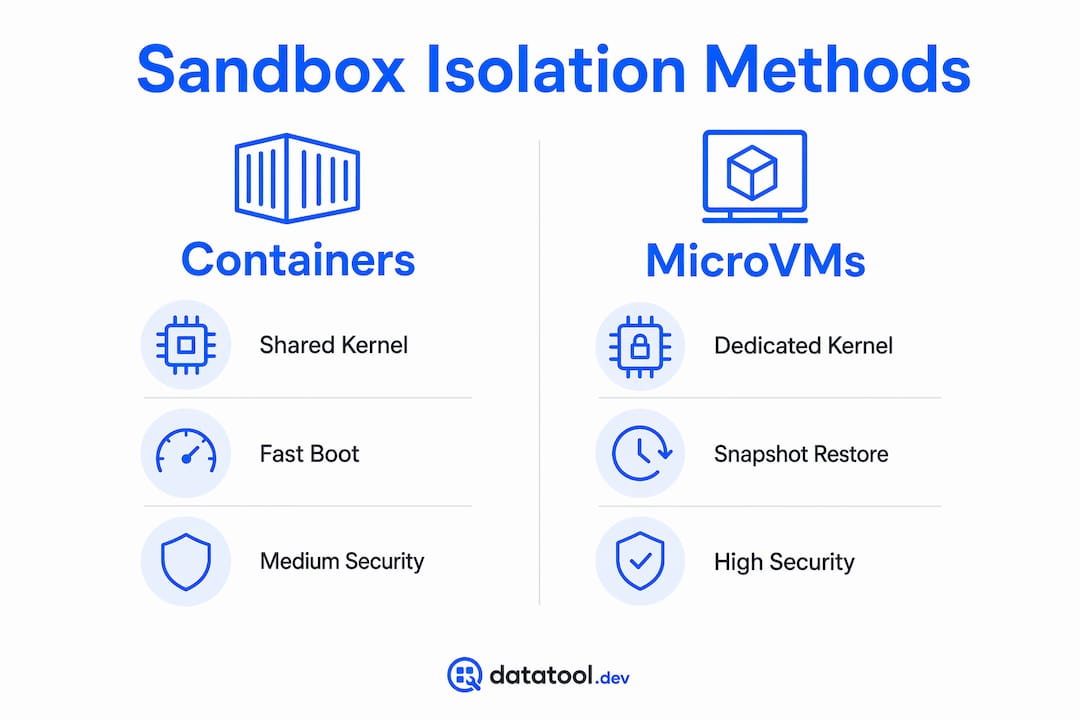
Container vs. microVM trade-offs
| Isolation type | Security level | Boot time | Shared kernel risk |
|---|---|---|---|
| Docker container | Medium | ~100ms | Yes |
| Firecracker microVM | High | 27–90ms | No |
| Full VM | Very high | Seconds | No |
Docker alone is insufficient for AI agent sandboxing due to its shared kernel architecture and kernel escape vulnerabilities. Multiple container escape CVEs in 2024 and 2025 exposed practical breakout paths. Firecracker microVMs give each sandbox a dedicated Linux kernel, eliminating cross-tenant risk entirely. Docker Desktop now runs sandboxes inside dedicated microVMs to address this directly.
Firecracker boots in sub-125ms with memory overhead under 5MB and snapshot/restore capabilities enabling fast provisioning. That makes it fast enough for production AI tool integration without sacrificing isolation.
Pro Tip: The minimum viable sandbox on Linux uses bubblewrap with Landlock, seccomp-BPF, non-root execution, and cgroups memory limits. No Docker or VM required for local developer protections.
How sandbox lifecycle management reduces cold starts and drift
Sandbox lifecycle management is the operational layer that determines how fast your AI development environment spins up, how long it lives, and how reliably it matches your production configuration.
The most effective pattern is the pooled sandbox model. Pre-initialized sandboxes wait in a warm state, ready for immediate acquisition. Cold start provisioning times drop to 27 to 90ms with pooled sandboxes that scale dynamically with load. That matters when an AI agent needs to spin up a fresh environment for each task.
Here is the lifecycle sequence that works in practice:
- Pre-build sandbox images with all required tooling baked in. Use a polyglot version manager like
miseto pin Node.js, Python, and other runtimes to exact versions. - Acquire atomically from the pool. Mark the sandbox as busy with a TTL to prevent double-acquisition under concurrent load.
- Auto-stop idle sandboxes after five minutes of inactivity. Destroy them after longer idle periods to reclaim resources.
- Communicate shared state through object-storage mounts or a database, not through the sandbox filesystem directly.
- Run health checks on pool members to detect zombie sandboxes before they corrupt a task.
Baking polyglot version managers like mise into sandbox images ensures tooling consistency, reducing runtime failures caused by environment drift between developer machines and agent environments. Mise manages Node.js, Python, and other runtimes from one configuration file. Without it, an agent running node 18 locally may silently fail in a sandbox running node 20.
MicroVMs enable snapshot/restore capabilities allowing sandbox state cloning in as little as 4 milliseconds. E2B, Vercel Sandbox, and Fly.io Sprites all use this pattern. It virtually eliminates cold start penalties for high-frequency agent execution.
Pro Tip: Never rely on runtime package installs inside a sandbox. If a package manager call fails mid-execution, the agent environment becomes partially configured and produces unpredictable output. Bake everything into the image.
Agent in sandbox vs. sandbox as tool: which pattern is safer?
Two architectural patterns dominate AI agent sandbox design. Choosing the wrong one exposes credentials and makes prompt injection attacks trivial.
Agent in Sandbox pattern:
- The AI agent process runs inside the sandbox alongside the code it executes.
- Credentials needed for API calls must exist inside the sandbox.
- A compromised agent can read those credentials directly.
- Prompt injection attacks that manipulate the agent can exfiltrate secrets.
Sandbox as Tool pattern:
- The agent runs on the server, outside the sandbox.
- The sandbox is a disposable tool the agent calls to execute specific code.
- Credentials never enter the sandbox.
- Each execution uses a fresh, stateless environment.
The Sandbox as Tool pattern is the correct default for production AI tool integration. Sandboxing with network isolation uses a proxy pattern where sandboxes run with --network none and route all network calls through a proxy that injects credentials and enforces domain allowlists. This prevents API keys from residing in the sandbox and protects against prompt injection and credential exfiltration attacks.
OpenAI Codex, Anthropic Claude, and E2B all implement variants of this pattern. The proxy sits between the sandbox and the internet, auditing every outbound request. The sandbox itself has no direct internet access and no knowledge of credentials.
Common pitfalls when using developer sandboxes with AI tools
These are the failures Datatool sees most often when developers integrate sandboxing into AI workflows.
- Credentials inside the sandbox. Passing API keys as environment variables into the sandbox is the most common mistake. Use the proxy pattern instead. The sandbox should never hold a secret it could leak.
- Environment drift. A sandbox that installs tools at runtime will diverge from your base image over time. One agent run succeeds; the next fails because a transient package install broke. Fix this by managing tool versions statically in the image.
- Unrestricted filesystem writes. Without Landlock or equivalent restrictions, an AI agent can write to sensitive config files. Restrict writes to a specific working directory and make everything else read-only.
- No atomic acquisition. Under concurrent load, two requests can acquire the same sandbox simultaneously. Use a busy marker with a TTL and automated health checks to prevent pool corruption.
- Choosing containers for untrusted code. If the AI tool executes user-influenced code, a container is not sufficient. Use Firecracker or an equivalent microVM.
Here is a concrete example of what breaks without proper isolation:
# Broken: agent writes config file outside working directory
import subprocess
result = subprocess.run(["python", "agent_task.py"], cwd="/tmp/work")
# Agent task.py writes to ~/.ssh/config — no restriction in place
# Fixed: restrict writes with Landlock via bubblewrap
import subprocess
result = subprocess.run([
    "bwrap",
    "--ro-bind", "/", "/",
    "--bind", "/tmp/work", "/tmp/work",
    "--dev", "/dev",
    "python", "agent_task.py"
], cwd="/tmp/work")
# Agent can only write inside /tmp/work
Pro Tip: Test your sandbox configuration by intentionally running code that attempts to write outside the allowed directory and read a credential file. If either succeeds, your isolation is incomplete.
Key takeaways
Developer sandboxes for AI tools require layered isolation, static environment configuration, and credential separation to function reliably and securely.
| Point | Details |
|---|---|
| Use microVMs for untrusted code | Firecracker provides dedicated kernels and boots in under 125ms, eliminating shared kernel risk. |
| Bake tooling into images | Polyglot managers like mise prevent environment drift and agent runtime failures. |
| Keep credentials out of sandboxes | The proxy pattern with --network none prevents credential exfiltration and prompt injection. |
| Pool sandboxes for performance | Pre-warmed pools reduce cold starts to 27 to 90ms and scale with concurrent agent load. |
| Restrict filesystem writes | Use Landlock or bubblewrap to limit agent writes to a defined working directory only. |
Why the sandbox as tool pattern is the right default
I have watched teams spend weeks debugging intermittent agent failures that traced back to a single root cause: the sandbox was configured once and then allowed to drift. A developer updated a local Python version. The sandbox image was never rebuilt. The agent started producing malformed output that looked like an LLM problem but was actually a runtime mismatch.
The industry is converging on the Sandbox as Tool pattern for good reason. It separates security contexts cleanly. The agent does not need to know about infrastructure. The infrastructure does not need to trust the agent. That separation is what makes the system auditable.
I am also watching WASM and user-space kernels gain traction as lighter alternatives to Firecracker for lower-risk workloads. They will not replace microVMs for high-security contexts, but they will make sandboxing accessible to teams that cannot justify the operational overhead of full microVM infrastructure.
The one thing I would push back on is the assumption that stronger isolation always means slower iteration. With snapshot/restore and pooled warm environments, a Firecracker-based sandbox can be faster to acquire than a cold Docker container. The performance argument against microVMs is mostly outdated.
— Gregory
Validate AI output inside your sandbox workflow with Datatool
When your sandbox executes AI-generated code, the structured data that comes back is often broken. LLMs produce malformed JSON, truncated objects, invalid escaping, and schema drift. Catching those failures inside your test pipeline is exactly what Datatool is built for.
Datatool repairs and validates broken JSON from AI output before it reaches your application logic. It handles wrapped responses, partial objects, and the full range of real-world LLM output failures. If you are building or testing AI tools inside sandboxed environments, Datatool fits directly into your validation step. Paste broken output. Get valid, schema-checked data back. You can also explore detecting malformed AI output as part of a broader agent reliability strategy.
FAQ
What is a developer sandbox in AI tool development?
A developer sandbox is an isolated execution environment that restricts AI-generated code from accessing host system resources, network, and credentials. It uses Linux namespaces, seccomp filters, and optionally microVMs to contain untrusted code execution.
Why are containers not enough for AI agent sandboxing?
Containers share the host kernel, which means a kernel exploit can break out of the container entirely. Firecracker microVMs give each sandbox a dedicated kernel, eliminating that risk. Multiple container escape CVEs in 2024 and 2025 confirmed this is a practical threat, not a theoretical one.
What is the proxy pattern in sandbox credential management?
The proxy pattern runs the sandbox with --network none and routes all outbound calls through a server-side proxy that injects credentials and enforces domain allowlists. API keys never enter the sandbox, which prevents exfiltration even if the agent is compromised.
How do you prevent environment drift in AI sandboxes?
Bake all tooling into the sandbox base image using a polyglot version manager like mise. Never install packages at runtime. Rebuild the image whenever tool versions change to keep agent and developer environments in sync.
What is the difference between Agent in Sandbox and Sandbox as Tool?
Agent in Sandbox runs the AI agent inside the execution environment, which requires credentials to live there too. Sandbox as Tool keeps the agent server-side and uses the sandbox only for code execution, keeping credentials out of the untrusted environment entirely.