

AI response templating is defined as the practice of constraining large language model outputs using reusable templates with dynamic slots and structured schema validation to produce consistent, parseable, and predictable responses. The industry term for this practice is structured output generation, and understanding both terms matters if you are reading API docs from xAI, Tiptap, or FutureAGI. Where prompt templating controls what goes into a model call, response templating controls what comes out. For developers building pipelines that consume AI output as data, this distinction is not academic. A malformed response at the output boundary breaks parsers, corrupts downstream state, and creates bugs that are hard to trace.
What is AI response templating and how does it work technically?
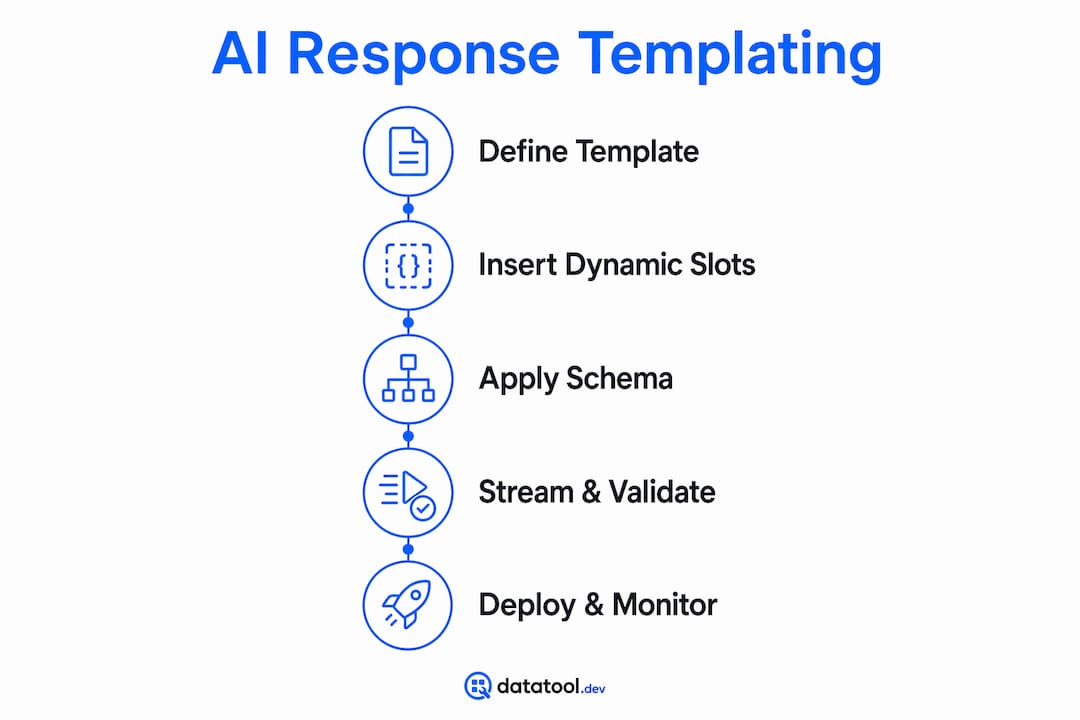
AI response templating combines a template skeleton with structured output enforcement to produce AI responses that match a defined format every time. The template defines fixed regions and dynamic slots. The model fills the slots. A validation layer confirms the output conforms before it reaches your application code.
The slot system is the core mechanism. Frameworks like the Tiptap AI Toolkit use markers such as "_templateSlot, _templateIf, and _templateAttributes` to mark dynamic regions that the model replaces at generation time, while fixed content stays untouched. This separation keeps your document structure stable regardless of what the model generates inside the slots.

Schema enforcement adds a second layer of control. The xAI API, for example, accepts response_format.type = 'json_schema' to force schema compliance, meaning the model emits a response that matches your defined JSON Schema rather than free text. This is the difference between getting a structured object you can parse and getting a paragraph you have to scrape.
Streaming progressive fill is the third component worth understanding. Tiptap tracks insertion ranges using a workflowId and a hasFinished flag to fill templates incrementally in real time. This avoids full re-renders on every token and keeps the UI stable during generation. For document editors and chat interfaces, this is a significant UX improvement over waiting for a complete response before rendering anything.
Pro Tip: Treat your template skeleton as immutable infrastructure. Version it in source control, test it against your schema on every deploy, and never let user input touch the fixed regions.
What are practical applications in customer service and automation?
AI response templating is the mechanism behind most production AI customer service systems. The pattern is consistent: a template defines the reply structure, the model fills in context-specific content, and a human agent reviews before sending.
Crisp's implementation shows this clearly. Their system uses templated draft replies where the AI detects intent, queries a knowledge base, and populates a structured response template. Agents then modify the draft before it reaches the customer. The template enforces brand voice and reply format. The model handles content generation. The agent handles judgment.
IBM describes the same pattern at enterprise scale. Their approach has AI surface relevant knowledge and draft responses within a controlled structure, with agents editing before submission. The result is faster resolution times without sacrificing consistency or accuracy.
Here is the typical workflow in a customer service AI system using response templating:
- The system receives an inbound message and classifies intent.
- A knowledge base lookup retrieves relevant facts or policy text.
- The AI fills a predefined reply template with the retrieved content and conversation context.
- The output is validated against a schema to confirm structure and required fields.
- The draft is surfaced to a human agent for review and personalization.
- The agent sends the final reply.
"AI surfaces relevant knowledge and drafts responses for agent editing, speeding resolution and maintaining business consistency." — IBM
This hybrid model is why AI response automation in customer service does not replace agents. It removes the blank-page problem and enforces structure, while humans handle nuance and accountability.
What benefits and challenges do developers face with AI response templating?
The primary benefit is output consistency. When every response conforms to the same schema, your parsing code is simpler, your error handling is predictable, and your downstream systems stay stable. JSON Schema validation catches malformed outputs before they reach application logic, which is far cheaper than debugging production failures.
Auditability is a second concrete benefit. FutureAGI's SDK connects template variables to output through declaration, rendering, and response, giving you a traceable path from slot definition to final value. This matters for debugging token overflow, detecting schema drift, and proving compliance in regulated environments.
Security is the third benefit that developers underestimate. Separating user input from template structure prevents prompt injection. If user-supplied content is concatenated into the instruction region of a prompt, an attacker can override your instructions. Response templating enforces output boundaries so injected instructions cannot alter the response format.
The challenges are real too:
- Template versioning gets complex fast. A schema change in one template can break multiple downstream consumers.
- Slot validation requires explicit rules for each dynamic region, including type, length, and allowed values.
- Token limits constrain how much content can fill a slot. A template designed for short answers breaks when the model generates a long one.
- Schema drift occurs when model behavior shifts across versions, producing outputs that pass validation but contain subtly wrong values.
Pro Tip: Validate outputs against your JSON Schema in your CI pipeline, not just in production. Catching schema drift early, before a model update ships, saves hours of debugging.
How does AI response templating differ from prompt templating?
These two concepts are related but operate at opposite ends of the model call. Conflating them causes real bugs.
| Concept | Where it applies | Primary purpose | Injection risk |
|---|---|---|---|
| Prompt templating | Input, before model call | Controls instructions and context sent to the model | High if user data is concatenated into instructions |
| Response templating | Output, after generation | Enforces structure and schema on what the model returns | Low, because user content stays in slots |
| Structured generation | Output, schema-enforced | Produces strictly typed, validated outputs like JSON | Low with proper schema enforcement |
Prompt templating modulates the instructions and context the model receives. Response templating enforces what the model returns. Structured generation, as implemented by providers like xAI, overlaps with response templating but focuses specifically on strict type validation against a declared schema.
The security implication is direct. If you concatenate user input into the instruction region of a prompt template, a user can inject instructions that override your system prompt. Response templating does not fix this. You need both: clean input handling at the prompt layer and schema enforcement at the output layer. Keeping these boundaries explicit in your codebase is a developer best practice that reduces structural errors and injection risk simultaneously.
Key takeaways
AI response templating is the output-boundary practice that makes AI-generated structured data reliable enough to use in production systems without manual inspection on every call.
| Point | Details |
|---|---|
| Definition is output-focused | Response templating enforces structure after generation, not before. It is distinct from prompt templating. |
| Slots plus schema equals reliability | Combining slot-based templates with JSON Schema validation catches malformed outputs before they reach application code. |
| Streaming fill improves UX | Tools like Tiptap use workflowId and hasFinished flags to fill templates incrementally, avoiding full re-renders. |
| Security requires separation | Isolating user content from fixed template regions prevents prompt injection at the output boundary. |
| Customer service is the leading use case | IBM and Crisp both use templated AI drafts with human review to accelerate responses without losing quality control. |
Why I treat response templates like typed code
Most developers I see treat AI response templates as an afterthought. They write a prompt, get a JSON-ish response, and add a try/catch around the parse. That works until the model updates, the slot content grows past the token limit, or a user finds the injection vector you did not know existed.
The teams that get this right treat templates like typed source code. They version them, test them against schemas in CI, and trace every variable from declaration to output. FutureAGI's approach of connecting variables to evaluation is the right mental model. Every slot is a typed field. Every output is a test case.
The progressive fill pattern from Tiptap is also underused outside of document editors. Any interface that shows AI output incrementally benefits from tracking insertion ranges rather than re-rendering the full response on each token. This is a performance and UX win that costs very little to implement once you have the template structure in place.
My practical advice: start with the output schema. Define what your application needs to receive, write the JSON Schema first, then build the template and prompt around it. Working backward from the output boundary forces clarity about what the model actually needs to produce, and it makes validation a first-class concern rather than a retrofit.
— Gregory
Fix and validate your AI-generated JSON with Datatool
If you are implementing AI response templating in a structured data pipeline, malformed outputs will happen. Models truncate, escape incorrectly, wrap JSON in markdown code fences, and drift from your schema across versions. Datatool is built specifically for these failure modes.
Datatool repairs broken JSON from LLM outputs, validates against your schema, and helps you catch structural errors before they reach production. Paste malformed output. Get valid, schema-conformant JSON back. It handles broken JSON, partial objects, invalid escaping, and truncation from any LLM. For developers building on top of AI response templates, Datatool removes the manual debugging step from your output validation workflow.
FAQ
What is AI response templating in simple terms?
AI response templating is the practice of using predefined templates with dynamic slots and schema validation to constrain what an AI model returns, producing consistent, structured outputs instead of free text.
How does AI templating differ from prompt templating?
Prompt templating controls the instructions sent to the model before generation. Response templating enforces the format and structure of what the model returns after generation. They operate at opposite ends of the model call.
What is JSON Schema used for in AI response templating?
JSON Schema defines the required structure, types, and fields that an AI response must conform to. Providers like xAI use response_format.type = 'json_schema' to enforce this compliance at the API level.
What are the main benefits of AI response templates for developers?
The main benefits are output consistency, easier parsing, improved auditability through variable tracing, and reduced prompt injection risk by isolating user content from fixed template regions.
Is AI response templating used in customer service?
Yes. IBM and Crisp both use templated AI drafts in customer service workflows, where the model fills a structured reply template and a human agent reviews before sending.